Free Online Quiz Maker
Turn a topic or your own text into a graded, shareable quiz in under a minute — free account, no card required. PDF, image and URL input on paid plans.
Free account, no credit card. 5 AI generations/month.
Try it now — no account needed
Type a topic and get two real questions from the same AI that writes full quizzes. Sign up free to get the whole quiz.
Popular exams in United States
Type a topic above to unlock quiz generation
What is SimpleQuizMaker?
SimpleQuizMaker is a free, AI-powered online quiz maker that lets you generate high-quality quizzes from any content. Paste a topic, upload a PDF or image, drop in a URL or YouTube video, and the AI returns a graded quiz in seconds. You can edit every question, share with a clean link, and track scores in real time.
We built SimpleQuizMaker because the existing tools — Google Forms, Microsoft Forms, Kahoot, Quizizz, Quizlet — each solve part of the problem. None of them combine fast AI generation, clean sharing without signup, and a free tier generous enough for a real classroom.
Who uses SimpleQuizMaker?
- Teachers (K-12 and higher ed) — generate weekly quizzes from chapter notes, share with classes via Google Classroom or a link. More for teachers →
- Students — self-quiz from lecture notes, textbook chapters, or certification study guides. More for students → How to turn notes into a practice quiz →
- Corporate trainers / L&D — compliance training, onboarding knowledge checks, safety quizzes from your SOPs. More for business →
- Content creators — personality and trivia quizzes for newsletters, Instagram, TikTok, and embedded marketing. Build a personality quiz →
- Trivia hosts — pub quizzes, family game nights, themed rounds. Trivia quiz maker →
- Faith communities — Sunday school, youth group, family Bible study. Bible quiz generator →
What it looks like
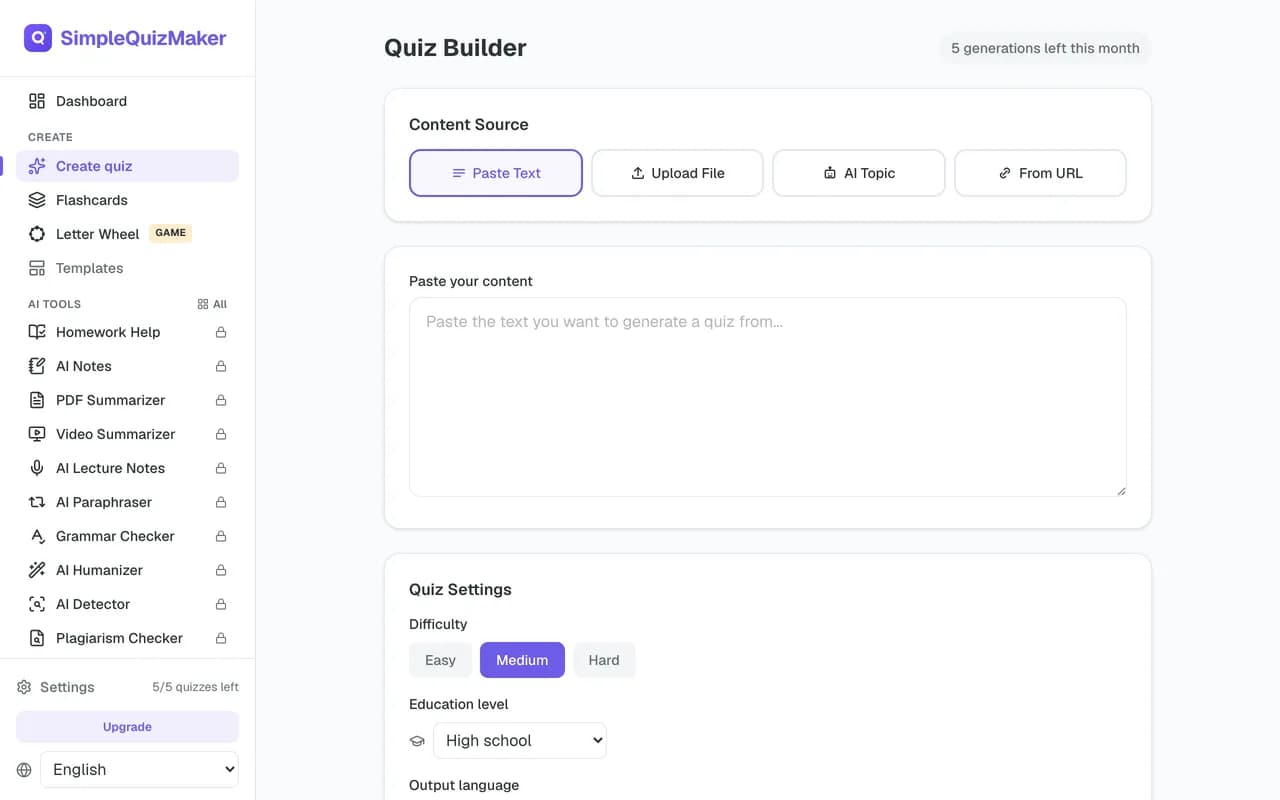
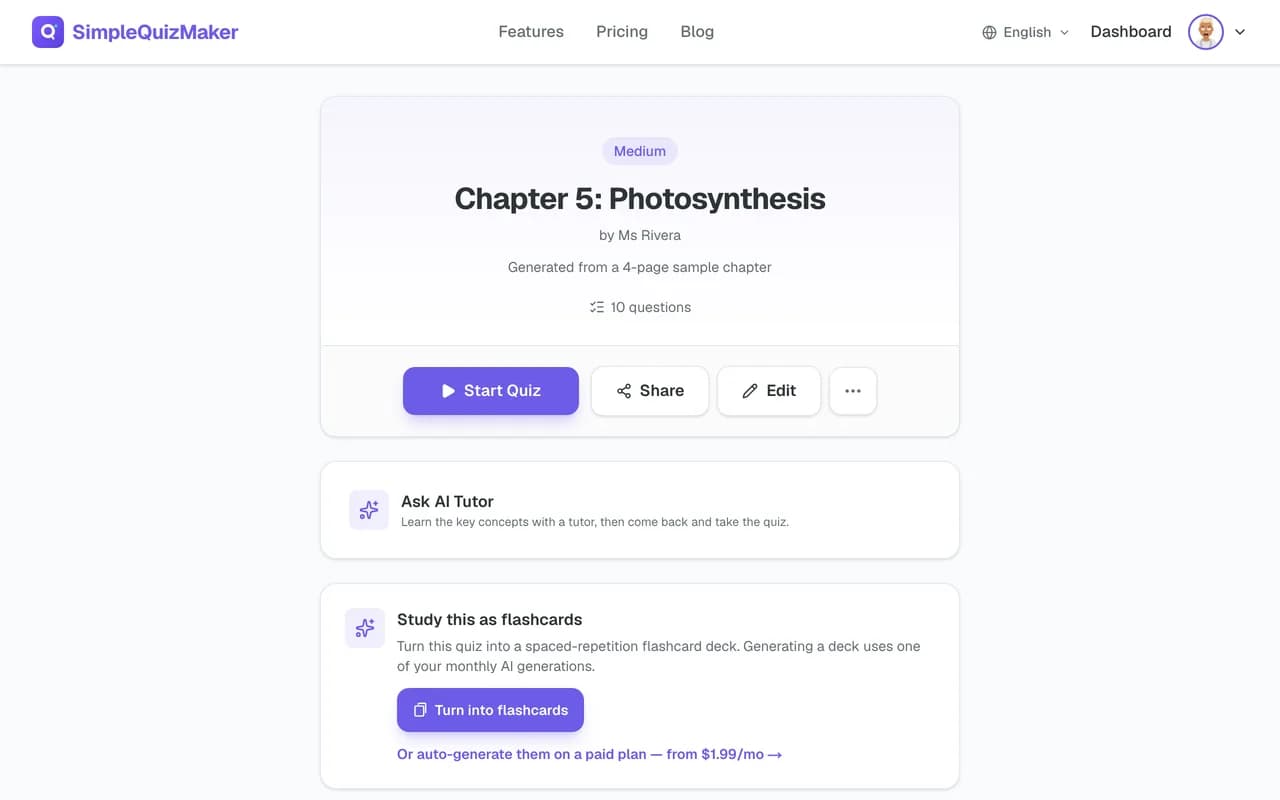
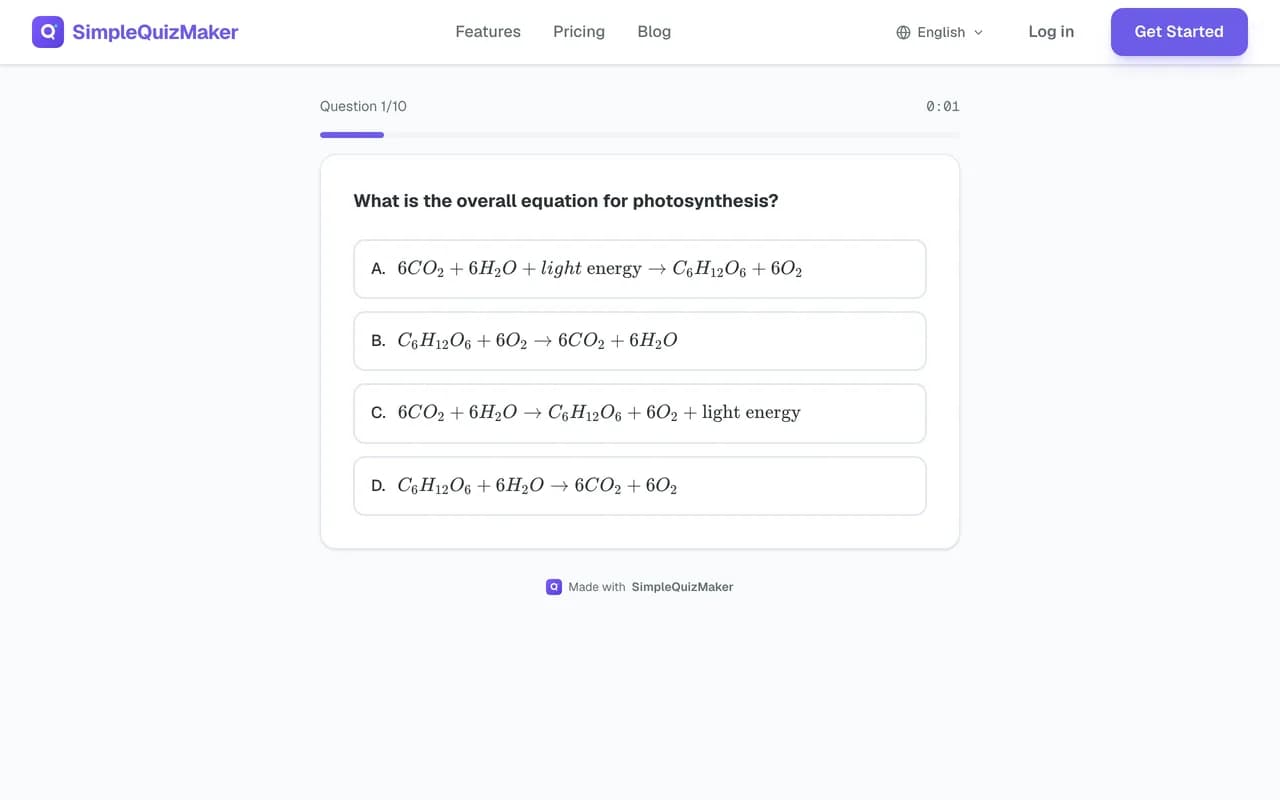
Key features
AI-powered generation from any source
Paste raw text, upload a PDF or image, link to a YouTube video, or drop in an article URL. The AI extracts the content and drafts a complete quiz with stems, distractors, and an answer key. Generation typically takes 10–30 seconds.
Four question types
- · Multiple choice — classic 4-option format
- · True / false — fast warm-up format
- · Short answer — for diagnostic / formative use
- · Fill in the blank — recall practice
Three difficulty levels (and Bloom's alignment)
Choose Easy, Medium, or Hard. Under the hood we map difficulty to Bloom's taxonomy levels — Easy questions test Remember/Understand, Hard questions test Analyse/Evaluate. Calibrating difficulty is the single biggest determinant of whether a quiz teaches or just measures.
Shareable link, no signup for takers
Every quiz gets a clean URL. Respondents take the quiz immediately — no email required, no account creation, no friction. Scores roll up in your dashboard.
Real-time analytics
Per-question difficulty (which questions are too easy, too hard, or have a misleading distractor), completion rates, and per-student scores. After 5 submissions you start seeing item-discrimination metrics — what is item discrimination?
Flashcard mode (spaced repetition)
Every quiz can be converted into a flashcard deck for spaced-repetition review. We use an SM-2 / Leitner-inspired algorithm — failed cards come back sooner, mastered cards stretch out. See spaced repetition: a student's guide. You can also skip the quiz step entirely and generate a deck straight from a topic or your notes on the dedicated flashcard maker.
Google Classroom integration
Assign quizzes directly to Google Classroom courses, sync scores to the gradebook, no copy-paste.
How to create a quiz in 60 seconds
- 1. Pick your source. Paste text, upload a PDF, drop in an image of a textbook page, or link to an article or YouTube video.
- 2. Configure. Choose the number of questions (5 or 10 on the free plan, up to 100 on paid plans), difficulty, and question types. Quiz title is optional — auto-generated otherwise.
- 3. Generate. The AI returns a complete quiz in 10–30 seconds. Stems, 4 answer choices per MCQ, marked correct answers.
- 4. Review and edit. Always review every question. You can rewrite or delete any question, or regenerate the whole set. AI generators occasionally misclassify the answer on negative-phrased questions — a quick review pass catches most of them.
- 5. Share. Copy the link. Send via email, post in a group, embed on your site, or assign in Google Classroom. Respondents take the quiz with no signup.
- 6. Track. View scores in real time. Per-question and per-student analytics surface in your dashboard.
For a deeper walkthrough including pedagogical guidance, see How to Make a Quiz: Step by Step.
A real quiz from a two-word topic
We typed only the topic “The water cycle” and chose 8 questions, medium difficulty, multiple choice, true/false. Generated on 2026-10-21 with the free plan's model. Nothing below has been edited — including the parts we would fix.
Multiple choice
1. What process involves water vapor cooling and changing into liquid water?
- Evaporation
- Condensation (correct answer)
- Precipitation
- Transpiration
Condensation is the process where water vapor cools and transforms into liquid water, forming clouds. Evaporation is the opposite process, while precipitation refers to water falling from clouds, and transpiration is the release of water vapor from plants.
Multiple choice
2. Which process in the water cycle is primarily driven by the sun's energy?
- Condensation
- Evaporation (correct answer)
- Precipitation
- Infiltration
Evaporation is driven by the sun's energy, which heats water in oceans, rivers, and lakes, causing it to turn into vapor. Condensation and precipitation are subsequent processes that depend on evaporation.
True / false
3. True or False: The water cycle is a closed system with no beginning or end.
- True (correct answer)
- False
The water cycle is indeed a closed system, as water continuously moves between its various states (liquid, vapor, solid) without a starting or ending point, maintaining a balance in nature.
Multiple choice
4. During which stage of the water cycle does water return to the Earth's surface?
- Evaporation
- Condensation
- Precipitation (correct answer)
- Transpiration
Precipitation is the stage where water, in the form of rain, snow, sleet, or hail, falls back to the Earth's surface. Evaporation and condensation are processes that happen prior to this stage.
Multiple choice
5. What is the primary role of transpiration in the water cycle?
- To cool the air
- To absorb groundwater
- To release water vapor (correct answer)
- To form clouds
Transpiration involves plants releasing water vapor into the atmosphere, which contributes to humidity and can lead to cloud formation. It does not directly cool the air or absorb groundwater.
True / false
6. True or False: Infiltration refers to water soaking into the ground.
- True (correct answer)
- False
Infiltration is the process through which water moves from the surface into the soil, contributing to groundwater replenishment. This statement is accurate.
Multiple choice
7. What effect does increased evaporation have on the water cycle?
- Decreased precipitation
- Increased humidity (correct answer)
- Less cloud formation
- More groundwater
Increased evaporation leads to more water vapor in the atmosphere, resulting in higher humidity levels. This can enhance cloud formation and precipitation, but does not directly decrease precipitation or groundwater.
Multiple choice
8. Which of the following is not a component of the water cycle?
- Evaporation
- Condensation
- Photosynthesis (correct answer)
- Precipitation
Photosynthesis is a biological process used by plants to convert light energy into chemical energy, and while it involves water, it is not a direct component of the water cycle, unlike evaporation, condensation, and precipitation.
What we would change before sharing it
- Question 2: "Which process is primarily driven by the sun's energy?" — the whole cycle is, so a careful student can argue for more than one option. Ask about heating surface water instead.
- Question 3: "A closed system with no beginning or end" mixes two ideas; students who know water can escape to space or be locked in rock for millions of years will hesitate. Keep it only if you taught it that way.
- Question 5: "To form clouds" is partly true — the explanation itself says transpiration can lead to cloud formation. Swap in a distractor that is plainly wrong.
5 of the 8 questions were ready to use as written. That is why every quiz opens in an editor before you share it.
Create a quiz from any source
From a PDF
Upload any PDF — chapter scan, lecture handout, course syllabus — and the AI extracts the text and generates a quiz scoped to the document. Works on most academic PDFs up to 50 pages. Create quiz from PDF →
From an image
Photograph a textbook page or whiteboard. OCR extracts the text; the AI generates a quiz from it. Useful when your source isn't digital. Create quiz from image →
From a YouTube video
Paste a YouTube URL. We pull the transcript and generate a quiz from the lecture or tutorial content. Great for flipped-classroom workflows. Create quiz from YouTube video →
From a website / article URL
Paste any public article URL. We fetch and clean the content, then generate a quiz. Useful for current-events units and news literacy lessons. Create quiz from URL →
From a topic name
Just type a topic (“Krebs cycle”, “French Revolution causes”, “Python list comprehensions”) and the AI generates a quiz from general knowledge. Verify the answer key against authoritative sources for high-stakes use.
Pre-built generators for popular subjects
We maintain dedicated, optimized generators for the subjects teachers and students most often quiz:
Free quiz maker for teachers
Teachers are the largest group using SimpleQuizMaker. The typical workflow: upload this week's chapter PDF, generate 20 questions, spend 10 minutes reviewing and editing, share the link in Google Classroom. No student accounts required — students click the link and go.
- Per-student analytics — after submissions roll in, you can see which question tripped up which student, and which questions the whole class missed (a signal to re-teach before moving on).
- Google Classroom integration — assign directly, scores sync to the gradebook.
- No student accounts — students join via link with no login, no email, no app install. Especially useful when not all students have school email addresses set up.
- CSV export — download results for your gradebook or admin reports (paid plans).
Read the teacher case study and the 10 ways to use AI quiz generators in the classroom for practical ideas. Full teacher overview →
Free quiz maker for students
Paste your lecture notes or a chapter summary and generate a self-quiz in seconds. Then convert it into a flashcard deck with spaced-repetition scheduling — the algorithm resurfaces cards just before you're likely to forget them, so review time goes further than re-reading.
- Works on any source — notes, textbook pages, YouTube lectures, online articles.
- SM-2-based spaced repetition — converts any quiz into a study deck with a research-backed review schedule.
- Test prep — used by students studying for NCLEX, USMLE, SAT, GRE, LSAT, bar exam, and professional certifications.
Best practices
Always verify the answer key
AI quiz generators have closed the gap on fluency, not accuracy. Take 5 minutes to verify every question — especially answer keys on negative-phrased items (“Which is NOT…”) which are the most common error class. See Designing Assessments AI Can't Cheat for the broader caution.
Strengthen distractors
AI-generated distractors are often too easy. The right wrong answers are common student misconceptions, not random plausible-sounding nonsense. Spend 30 seconds per question upgrading distractors to ones you've actually heard students say.
Calibrate difficulty
Target ~70% average score across your class. Lower and you'll lose engagement; higher and you're not measuring anything. Per-question difficulty in the analytics dashboard tells you which items to recalibrate.
Mix question types
Don't make a 20-question pure-MCQ quiz. Mix 12 MCQ + 4 TF + 4 short answer to test different cognitive levels and reduce guessing.
Use the right number of questions
See How many questions should a quiz have? for guidance. Quick rule: 10–15 for a weekly check, 25–40 for a unit assessment.
How SimpleQuizMaker compares
The free quiz tool market splits into three camps. SimpleQuizMaker is in the first.
- AI-first generators (SimpleQuizMaker, Quizgecko, Conker) — fast source-to-quiz workflow. Best for teachers and students.
- Game-show tools (Kahoot, Quizizz, Mentimeter, Socrative) — synchronous, live gameplay. Best for classroom engagement moments.
- Form builders (Google Forms, Microsoft Forms) — flexible but slow; no AI generation. Best when you already have all the questions written.
For head-to-head comparisons, see our alternatives page with 16 detailed comparisons.
Pricing
The core quiz maker is free forever — no credit card, no trial period, no hidden gate. The free plan resets every month so it stays usable indefinitely.
| Feature | Free | Paid plans from $1.99/mo |
|---|---|---|
| AI generations / month | 5 | 15–80 |
| Submissions per quiz | Unlimited | Unlimited |
| Question types | All 4 | All 4 |
| Shareable link (no student login) | ✓ | ✓ |
| See every response in your inbox | ✓ | ✓ |
| Full per-student analytics | — | ✓ |
| File upload (PDF, image) | — | ✓ |
| Spaced repetition flashcards | ✓ | ✓ |
| Google Classroom sync | — | ✓ |
| CSV export | — | ✓ |
| Student tracking dashboard | — | ✓ |
Frequently asked questions
Is SimpleQuizMaker really free?
Yes. Create a free account (no card required) and generate up to 5 AI quizzes a month. Paid plans unlock higher quotas, analytics, and file uploads.
Do my respondents need an account?
No. Anyone with the link can take a quiz immediately — no signup, no email gate.
What can I generate a quiz from?
Text, PDF, image (OCR), YouTube transcript, website URL, or just a topic name.
Can I edit AI-generated questions?
Yes. Every question is editable: rewrite it, change the answer choices or delete it before you share. If the whole set misses the mark, regenerate it. Review every question before sharing.
How is this different from Kahoot or Quizizz?
SimpleQuizMaker focuses on quiz creation speed (AI from any source) and clean sharing (no signup for takers). Kahoot and Quizizz are game-show style with synchronous gameplay. See the detailed Kahoot and Quizizz comparison pages.
Is it safe to use AI for classroom assessments?
Yes, when paired with a verification pass and good distractor design. See Is Using AI to Make Quizzes Cheating? for the pedagogical framing.
Ready to make your first quiz?
Free account, no credit card. First quiz in under 60 seconds.
Start Building — FreeRelated guides
- · The best free quiz makers (2026)
- · How AI quiz generators work
- · How to make a quiz step-by-step
- · How to write good quiz questions
- · Quiz question types explained
- · Best AI for making quizzes (2026)
- · How to make a study quiz
- · 10 ways to use AI quiz generators in the classroom
- · How AI quiz generators save teachers time
- · Online test maker — for longer graded tests
Popular guides
The guides and question lists readers use most.
- How to Use Google Forms Quiz Mode: 5 Steps
- 100 Sports Trivia & Quiz Questions with Answers
- 70 Movie Trivia Questions, Easy to Hard
- 50 Fill-in-the-Blank Questions with Answers
- 80 General Knowledge Questions for Kids (with Answers)
- 100 Personality Quiz Questions (with Answers)
- 80 True or False Questions with Answers
- 80 Music Trivia Questions by Decade (with Answers)
- How to Make a Quiz on PowerPoint (Step-by-Step)
- How to Make a Quiz in Teams: 3 Ways (2026)
- How to Make a Quiz in Microsoft Word
- 50 Bible Quiz Questions for Kids (With Answers)